A Comparison of Open Source LLM Frameworks for Pipelining
by Natalia Kuzminykh , Associate Data Science Content Editor
Open-source LLM frameworks fall into three categories: orchestration libraries (LangChain, LlamaIndex, Haystack) that connect models to data and tools; low-code platforms (Botpress, Dify, Onyx) that let teams build LLM applications visually; and RAG-oriented search tools (Typesense, Inkeep) that handle retrieval over private data. This article compares the most widely used options in each category, with installation notes, code examples, and an at-a-glance summary table below.
A fourth category has taken shape since this was first published: agent-orchestration frameworks, which add state, branching and control across multiple steps on top of the three categories above. It’s covered in its own section below. Two of the tools this article originally covered are no longer viable recommendations: Flowise was archived and is winding down support, while Verba is shut down. They’re kept here only as dated examples of how fast this space moves.
Open Source LLM Frameworks Compared
| Framework | Category | Licence | GitHub stars | Best for | Main weakness |
|---|---|---|---|---|---|
| LangChain | Orchestration library | MIT | 144.6k | General-purpose pipelines, multi-model apps, agent workflows | Broke its own release cadence twice before 1.0 stabilised it in October 2025 |
| LlamaIndex | Orchestration library | MIT | 51.7k | Search and retrieval with rich document metadata | Documentation often lags releases |
| Haystack | Orchestration library | Apache-2.0 | 26.3k | Enterprise semantic search and QA pipelines | Narrower scope than LangChain |
| Botpress | Low-code agent platform | Proprietary platform / MIT developer tools | 14.9k | Building and deploying agents visually in Botpress Studio | The GitHub repository covers integrations and developer tools, not the hosted platform itself |
| Dify | Low-code platform | Apache-2.0 with a multi-tenant restriction | 152.9k | Production-grade BaaS plus LLMOps in one place | Needs a commercial licence to host it as a multi-tenant SaaS |
| Low-code platform | Apache-2.0 | 55.4k when archived | Archived August 2026 - kept here only as a churn example, not a recommendation | Read-only; core support ends 31 August 2026 | |
| Helix | Agent-fleet platform | Custom | 798 | Running a fleet of sandboxed coding agents (Claude, Codex, Gemini or your own models) with full visibility into their work | Smaller community than the open-source frameworks above |
| Danswer (now Onyx) | Low-code platform | Mixed | 9.8k | Workplace knowledge search over Slack, Drive, Confluence | Self-hosted setup complexity |
| Typesense | RAG-oriented search | GPL-3.0 | 26.5k | Fast, typo-tolerant search with built-in vector and hybrid search | Newer to the LLM-native features than purpose-built RAG tools |
| RAG-oriented search | BSD-3-Clause | 5k | Archived June 2026 - kept here only as a churn example, not a recommendation | Dead: no further updates or fixes | |
| Inkeep | RAG-oriented search | Elastic License 2.0 (framework) / proprietary (managed product) | n/a | Self-serve customer support over documentation | Managed product still closed source |
| LangGraph | Agent-orchestration framework | MIT | 40k | Stateful, branching multi-step agent graphs with built-in retries and durable execution | More graph-building overhead than a role-based framework for a single simple agent |
| CrewAI | Agent-orchestration framework | MIT | 57.3k | Fastest path to a first working multi-agent prototype, via a role-based “crew” abstraction | Less low-level control over execution flow than a graph-based framework |
| Microsoft Agent Framework | Agent-orchestration framework | MIT | 12.9k | Enterprise .NET or Python shops standardising on a single Microsoft-supported agent SDK | Young - reached general availability in April 2026 - and Python/.NET only |
| Pydantic AI | Agent-orchestration framework | MIT | 19.4k | Lightweight, type-safe single-agent work bolted onto an existing Pydantic-typed codebase | Broke its own “no breaking changes” promise after nine months, in a real migration-grade v2.0.0 |
| DSPy | Prompt-optimisation framework, not agent-orchestration | MIT | 37k | Optimising prompts and few-shot examples for a pipeline you’ve already built | Has no multi-agent runtime or state graph of its own - a common but mistaken inclusion in this category |
Star counts are a snapshot from August 2026 and will have moved by the time you read this - treat them as a rough sense of scale, not a live number. Each row below the table is unpacked in the rest of this article, including installation steps and minimal working code where it exists.
The LLM framework landscape has consolidated since this article first appeared. LangChain remains the default orchestration choice, but the centre of gravity has shifted to LangGraph for stateful, agentic workflows. LlamaIndex is now the strongest pick when retrieval quality is the primary constraint, and Haystack 3.0 has matured into a credible enterprise option for semantic search and QA. On the low-code side, Dify has pulled ahead of the pack (Flowise, its closest rival, was archived in August 2026 and is winding down support), and Helix has grown from an on-premise GPU target into a private agent-fleet platform for teams that want to run their own agents on their own infrastructure.
The bigger change is that “pick a framework” is rarely the hard part of an LLM build any more. The hard parts are RAG evaluation, agent reliability, observability, and cost control at production volume. That’s where most projects stall, and it’s where our LLM consulting and development services spend most of the engagement: choosing the right framework for the workload, then wiring it into your data, evals, and serving stack so it survives contact with real users.
Cost control starts below the framework, with which inference engine to serve them with.
Integrating an open source LLM framework into your project doesn’t have to be difficult or expensive, thanks to the variety of LLMOps tools available today. Our LLM consulting services help organizations select and implement the right framework. Open-source LLM orchestration frameworks offer practical solutions for specific business challenges and come with the additional benefit of a big supportive community. However, these tools each have their own set of pros and cons.
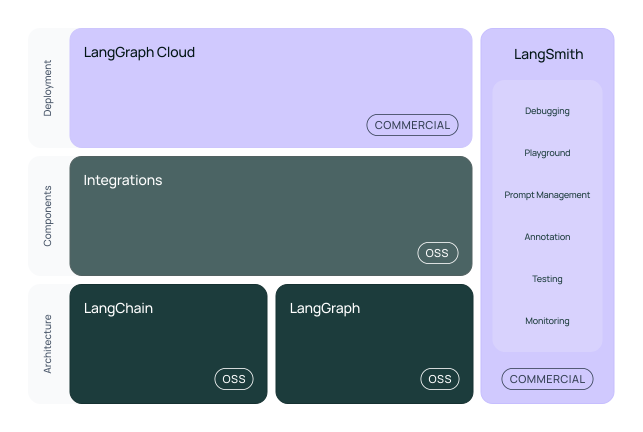
Firstly, it’s important to understand that “free” doesn’t necessarily mean without any cost. LangChain, for example, offers both the LangSmith platform for optimization and the LangGraph component for building complex, controllable AI-driven flows as open-source. Yet, some tools may provide only one of these components as open-source while keeping the other proprietary. Also, don’t forget that although many LLMOps are free in terms of licensing, the long-term expenses for hosting a finished application and maintaining the backend can add up, so it’s worth considering this before you commit to your chosen LLMOps tool.
Another essential consideration is that such a library or framework should be able to seamlessly integrate with your existing LLM architecture. To help with this, we have compiled a list of the best LLM frameworks and community-approved LLM technologies for various stages of model development and skill levels.
LLM Framework Evaluation Criteria
In our evaluation of LLM frameworks, we combined subjective analysis with some objective metrics, primarily sourced from GitHub. We closely examined repository statistics, such as the number of stars, to estimate the framework’s popularity. However, it’s important to note that this metric can be misleading, as a higher number of stars may simply reflect more effective marketing strategies.
Our evaluation criteria included modularity, ease of use, flexibility and maturity. We also considered simplicity, although it sometimes conflicts with modularity and flexibility. We formed our opinions by weighing these criteria against each other in order to make an informed decision.
This article is divided into four main sections:
- key LLM-oriented libraries, which compares Llamaindex vs LangChain,
- low-code solutions for model integration, and
- tools to assist with RAG integration.
- agent-orchestration frameworks, which didn’t exist as a category when this was first written.
Overview of Top LLM Frameworks
LangChain
- License: MIT
- Stars: 144.6k
- Current Version: 1.3, built on LangGraph as its execution engine
LangChain is a versatile open-source LLM orchestration framework designed to simplify the development of AI applications. It serves as a unified platform, providing a cohesive environment where developers can seamlessly develop and integrate popular large language models with external data sources and software workflows.
For example, suppose you want to build a QA chatbot that can guide you through information from sources like Slack chats, PDFs or CSV files. With LangChain, you can easily achieve this by selecting an appropriate data loader or adapting one from Llama Hub. You can then define the best vector database provider, whether cloud-based or local, and incorporate monitoring tools such as LangSmith.
Langchain is a modular python LLM library. The modular structure of LangChain allows easy comparison of different prompts and AI models, minimizing the need for extensive code modifications. This flexibility is especially useful for combining multiple LLMs within a single environment, reducing costs and ensuring smooth fallbacks from one model to another if there are unexpected challenges.
Installing LangChain
The core code is freely available on GitHub. To install it in Python, please run:
pip install langchain
A single pip install langchain gets you less than it did in 2024: langchain-community, the bundle of third-party integrations, was formally sunset in May 2026, and most integrations now live in their own standalone packages, installed individually as you need them.
Adding popular large language models is typically straightforward and often requires just an API key from the provider. The LLM class offers a standardized interface for all supported models. Note that while proprietary models from providers like OpenAI or Anthropic may come with associated costs, many open-source models such as Mixtral or Llama, are easily accessible through Hugging Face.
Another key feature of LangChain is its use of chains, which combine LLMs with other components to perform sequential tasks. The early releases used prebuilt chains like LLMChain and ConversationalRetrievalChain; LangChain Expression Language (LCEL) and the Runnable protocol then replaced those with composable chains built from the | operator. That took LangChain through three breaking major versions, 0.1 through 0.3, before LangChain 1.0 reset the whole model in October 2025: agents are now built directly on LangGraph rather than assembled as chains, and LangChain has committed to no further breaking changes until 2.0. LCEL still works for the kind of linear pipeline in the example below, but it’s no longer where the framework’s development effort goes.
from langchain_openai import ChatOpenAI
from langchain_core.prompts import ChatPromptTemplate
from langchain_core.output_parsers import StrOutputParser

prompt_template = "tell me a joke about {topic}"
prompt = ChatPromptTemplate.from_template(prompt_template)

llm = ChatOpenAI()
chain = prompt | llm | StrOutputParser()
chain.invoke({"topic": "bears"})
The example above demonstrates how to initialize a model alongside a prompt template. By saving a prompt as prompt_template and using ChatOpenAI(), you can create a processing chain that generates a joke from a given topic. The chain is defined as chain = prompt | llm | StrOutputParser(). Here, the | symbol acts similarly to a Unix pipe operator, seamlessly taking output from one component and passing it as input to the next. So, in this sequence:
- The user’s request is fed into the prompt template.
- The prompt template’s output is then processed by the OpenAI model.
- The model’s output is handled by the output parser.
To run the chain with a specific input, you simply call chain.invoke({"topic": "bears"}).
LlamaIndex
- License: MIT
- Stars: 51.7k
- Current Version: v0.14
If you’re familiar with LlamaIndex, you’ll notice its similarities to the LangChain library. However, it stands out in its performance for search and retrieval tasks. Its effectiveness in indexing and querying data makes it an excellent choice for projects requiring robust search capabilities.
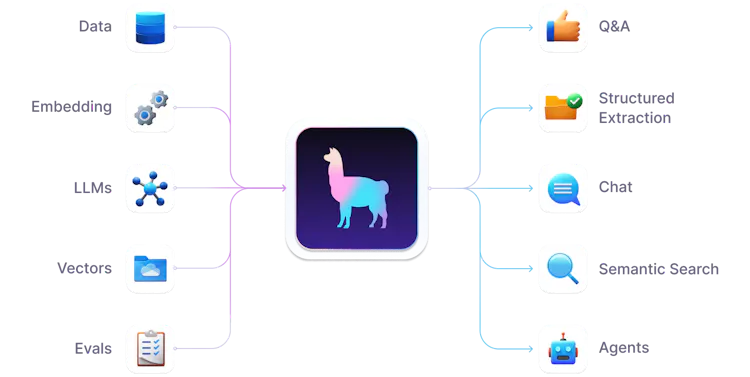
One of the key advantages that LlamaIndex has over LangChain in RAG is its enhanced schema for loaded data.
LlamaIndex offers a more detailed and structured metadata schema that includes file-specific information such as the file name, type and size, as well as creation and modification dates. Additionally, it supports exclusion lists for metadata keys that should be ignored during embedding and LLM processing, providing flexibility in selecting which information is utilized. Furthermore, it enables customizable templates for both text and metadata, granting users greater control over how document information is presented.
- LangChain’s Document Schema
[Document(
    metadata={'source': '/content/data/text.txt'},
    page_content='\n\nWhat I Worked On\n\nFebruary 2021\n\nBefore college the two main things I worked on, outside of school, were writing and programming....Thanks to Trevor Blackwell, John Collison, Patrick Collison, Daniel Gackle, Ralph Hazell, Jessica Livingston, Robert Morris, and Harj Taggar for reading drafts of this.'
)]
- LlamaIndex’s Document Schema
[Document(
    id_='972f6e28-6a0f-43a4-9e1e-6df1c4373987',
    embedding=None,
    metadata={
        'file_path': '/content/data/text.txt',
        'file_name': 'text.txt',
        'file_type': 'text/plain',
        'file_size': 75393,
        'creation_date': '2024-07-17',
        'last_modified_date': '2024-07-16'
    },
    excluded_embed_metadata_keys=[
        'file_name', 'file_type', 'file_size', 'creation_date', 'last_modified_date', 'last_accessed_date'
    ],
    excluded_llm_metadata_keys=[
        'file_name', 'file_type', 'file_size', 'creation_date', 'last_modified_date', 'last_accessed_date'
    ],
    relationships={},
    text='\r\n\r\nWhat I Worked On\r\n\r\nFebruary 2021\r\n\r\nBefore college the two main things I worked on, outside of school, were writing and programming...Thanks to Trevor Blackwell, John Collison, Patrick Collison, Daniel Gackle, Ralph Hazell, Jessica Livingston, Robert Morris, and Harj Taggar for reading drafts of this.',
    mimetype='text/plain',
    start_char_idx=None,
    end_char_idx=None,
    text_template='{metadata_str}\n\n{content}',
    metadata_template='{key}: {value}',
    metadata_seperator='\n'
)]
If you decide to use this module, be aware that LlamaIndex documentation can, however, be unreliable. The library undergoes frequent changes, which means that you could spend a significant amount of time resolving inconsistencies and compatibility issues when following official documentation or tutorials.
Installing LlamaIndex
LlamaIndex supports both Python and TypeScript, with OpenAI’s GPT-3.5-turbo as its default language model. To get started, you need both to set up your API key as an environment variable and ensure that you installed the library correctly.
For macOS and Linux, use the following command:
export OPENAI_API_KEY=YOUR_API_KEY
On Windows, use:
set OPENAI_API_KEY=YOUR_API_KEY
To install the Python library, run:
pip install llama-index
Configuring LlamaIndex Documents
Place your documents in a folder named data. Then call a SimpleDirectoryReader loader and a VectorStoreIndex to store them in memory as a series of vector embeddings:
from llama_index.core import VectorStoreIndex, SimpleDirectoryReader
# Load documents from the data folder
documents = SimpleDirectoryReader("data").load_data()

# Create an index from the loaded documents
index = VectorStoreIndex.from_documents(documents)
Now you can create an engine for Q&A over your index and ask a simple question.
# Create a query engine from the index
query_engine = index.as_query_engine()

# Ask a question
response = query_engine.query("What did the author do growing up?")
print(response)
You should receive a response similar to: “The author wrote short stories and tried to program on an IBM 1401.”
Haystack
- License: Apache-2.0
- Stars: 26.3k
- Release: 3.0.0, a second ground-up rewrite since this article first covered v2.3.0
Haystack is often favored for its simplicity and is frequently chosen for lighter tasks or quick prototypes. It’s particularly useful for developing large-scale search systems, QAs, summarization and conversational AI applications.
Since its launch in 2017, Haystack has evolved into a powerful tool, particularly excelling in semantic search. But, unlike simple keyword matching, it understands the context of users’ queries. It also has specialized components for various tasks, enabling it to manage everything from data ingestion to result generation. This significantly sets it apart from more general-purpose frameworks like LlamaIndex and LangChain.
One of Haystack’s strengths lies in its extensive documentation and active community, which simplifies the onboarding process for new users and provides ample support. Despite its focus on document understanding and retrieval tasks, which could be seen as a limitation compared to the broader capabilities of other frameworks, Haystack is ideal for enterprise-level search. It’s particularly well-suited to industries requiring precise and contextual information retrieval, such as finance, healthcare and legal sectors. Its specialization also makes it a strong candidate for knowledge management systems, helping organizations provide accurate and contextual information to users.

Installing Haystack
To get started with Haystack, install the latest release using pip:
pip install --upgrade pip
pip install haystack-ai
Then create a QA system with a DocumentStore, which stores the documents used to find answers. For this case, we use the InMemoryDocumentStore, which is simple to set up and suitable for small projects and debugging. However, it doesn’t scale well for larger document collections, so it’s not ideal for production systems.
import os
from haystack import Pipeline, Document
from haystack.utils import Secret
from haystack.document_stores.in_memory import InMemoryDocumentStore
from haystack.components.retrievers.in_memory import InMemoryBM25Retriever
from haystack.components.generators import OpenAIGenerator
from haystack.components.builders.answer_builder import AnswerBuilder
from haystack.components.builders.prompt_builder import PromptBuilder

# Write documents to InMemoryDocumentStore
document_store = InMemoryDocumentStore()
document_store.write_documents([
    Document(content="My name is Jean and I live in Paris."),
    Document(content="My name is Mark and I live in Berlin."),
    Document(content="My name is Giorgio and I live in Rome.")
])
Next we initialize an InMemoryBM25Retriever, which sifts through all the documents and returns the ones relevant to the question. Afterwards, we set up a RAG pipeline to use a prompt template to generate answers based on retrieved documents and the input question.
# Build a RAG pipeline
prompt_template = """
Given these documents, answer the question.
Documents:
{% for doc in documents %}
    {{ doc.content }}
{% endfor %}
Question: {{question}}
Answer:
"""

retriever = InMemoryBM25Retriever(document_store=document_store)
Finally, with a run() method, you could test your app and ask a question.
prompt_builder = PromptBuilder(template=prompt_template)
llm = OpenAIGenerator(api_key=Secret.from_token(api_key))

rag_pipeline = Pipeline()
rag_pipeline.add_component("retriever", retriever)
rag_pipeline.add_component("prompt_builder", prompt_builder)
rag_pipeline.add_component("llm", llm)
rag_pipeline.connect("retriever", "prompt_builder.documents")
rag_pipeline.connect("prompt_builder", "llm")

# Ask a question
question = "Who lives in Paris?"
results = rag_pipeline.run({
        "retriever": {"query": question},
        "prompt_builder": {"question": question},
    })

print(results["llm"]["replies"])
Overview of Agent-Orchestration Frameworks
Agent-orchestration frameworks add state, branching and control across multiple steps, on top of what an orchestration library like LangChain or LlamaIndex already provides. They exist because a single prompt-response chain doesn’t hold up once an agent needs to plan, call tools, check its own work and retry - and none of the three orchestration libraries above were built with that loop as the primary abstraction. A layer below this one does the same job without a graph at all: a general-purpose harness that owns a single agent’s loop, tools and sandbox. Our agent harness comparison covers the nine worth choosing between, and when a framework still earns its place on top.
LangGraph
LangGraph is LangChain’s own agent-orchestration layer, and since LangChain 1.0 (October 2025) it’s the execution engine LangChain agents actually run on, not a separate add-on. It models an agent as a graph of nodes and edges rather than a linear chain, which is what makes branching, retries and human-in-the-loop checkpoints straightforward to express. MIT licence, around 40k GitHub stars. Best for stateful, multi-step agents that need durable execution; the trade-off is more graph-building overhead than a role-based framework when the job is genuinely a single simple agent.
pip install -U langgraph
A graph needs at least one node and the edges that connect it to the graph’s start and end:
from langgraph.graph import StateGraph, START, END
from typing import TypedDict

class State(TypedDict):
    topic: str
    joke: str

def tell_joke(state: State) -> State:
    return {"joke": f"Why did the {state['topic']} cross the road?"}

graph = StateGraph(State)
graph.add_node("tell_joke", tell_joke)
graph.add_edge(START, "tell_joke")
graph.add_edge("tell_joke", END)

app = graph.compile()
app.invoke({"topic": "chicken"})
Real graphs add more nodes and conditional edges - a router node that decides which tool to call next, a retry edge that loops back on failure - but the shape above, define nodes, wire edges, compile, invoke, holds regardless of how many nodes you add.
CrewAI
CrewAI takes a different starting point: instead of a graph, you define a “crew” of role-based agents - a researcher, a writer, a reviewer - and let them hand work to each other. That gets a first working multi-agent prototype running faster than wiring up a graph by hand, which is CrewAI’s main appeal. MIT licence, around 57k GitHub stars. The trade-off is less low-level control over execution flow than LangGraph offers; CrewAI’s own May 2026 changelog deprecated its original default executor (CrewAgentExecutor) in favour of a new AgentExecutor, a sign the framework is still finding its shape.
pip install crewai
Two agents, two tasks, one crew:
from crewai import Agent, Task, Crew

researcher = Agent(
    role="Researcher",
    goal="Find a good joke topic",
    backstory="You have a sharp eye for what's funny.",
)

writer = Agent(
    role="Writer",
    goal="Write the joke",
    backstory="You turn topics into punchlines.",
)

research_task = Task(
    description="Pick a topic for a joke about animals.",
    expected_output="A single topic word.",
    agent=researcher,
)

write_task = Task(
    description="Write a short joke about the chosen topic.",
    expected_output="One joke, one or two sentences.",
    agent=writer,
)

crew = Crew(agents=[researcher, writer], tasks=[research_task, write_task])
crew.kickoff()
The researcher’s output feeds the writer’s task automatically - CrewAI passes each completed task’s result as context to the next one in sequence.
Microsoft Agent Framework
Microsoft Agent Framework reached general availability in April 2026 as the convergence of two older Microsoft projects, AutoGen and Semantic Kernel, both of which now get only maintenance updates rather than new features. Install with pip install agent-framework (Python and .NET only - no support for other ecosystems). MIT licence, around 13k GitHub stars. It’s the natural pick for a team already standardised on Microsoft’s stack that wants one supported agent SDK rather than piecing one together; being under five months old at GA is the honest caveat.
Pydantic AI
Pydantic AI is the lightweight option: type-safe agent definitions that sit naturally on top of a codebase already using Pydantic models, without adopting a full orchestration platform. Install with pip install pydantic-ai. MIT licence, around 19k GitHub stars. It’s a good fit for a narrow, well-defined agent rather than a complex multi-agent system - and worth a second look at its own history before trusting any framework’s stability promises: it hit v1.0.0 in September 2025 with an explicit “no breaking changes until V2” commitment, then shipped a genuinely breaking v2.0.0 nine months later, in June 2026, alongside a new first-party “Pydantic AI Harness” product for the state, retries and observability layer a framework like this doesn’t provide out of the box.
DSPy
DSPy doesn’t really belong in this category, and it’s worth saying so rather than quietly filing it here anyway: its own tagline is “the framework for programming - not prompting - language models”, and it has no multi-agent runtime or state graph of its own. What it does is optimise the prompts and few-shot examples inside a pipeline you’ve already built with something else. Install with pip install dspy. MIT licence, around 37k GitHub stars. Worth knowing about if you’re tuning an agent’s prompts systematically rather than hand-editing them, but it solves a different problem to the other four frameworks in this section.
If you’re building an agent rather than just picking a framework for one, that’s the layer our own team works in - the framework is rarely the part that decides whether it survives contact with production. For a worked build rather than a framework-selection view, see how to build an AI agent.
Overview of Low-Code LLM Projects
Botpress
- License: Proprietary hosted platform; developer tools are MIT
- Stars: 14.9k
Botpress is an active hosted platform for visually building AI agents in Botpress Studio. The product has evolved from its earlier chatbot focus, but Studio itself has not been sunset. The retirement notice in the v12 documentation applies only to the legacy self-hosted Botpress v12 product, whose dormant repository now directs users to Botpress Cloud.
The active botpress/botpress repository contains the MIT-licensed integrations, SDK, CLI and bots-as-code examples used with Botpress Cloud. It is not the source code for the hosted Studio, and Botpress describes its bots-as-code approach as an option for experienced developers rather than a replacement for Studio.

Installing Botpress
npm install -g @botpress/cli
Danswer (now Onyx)
- License: Mixed
Danswer renamed itself to Onyx - the old danswer-ai GitHub org now redirects to onyx-dot-app - so every reference and install step below points at the new name.

Onyx aims to make workplace knowledge easily accessible through natural language queries, much like a chatbot. This library can be seamlessly used together with workplace platforms like Slack, Google Drive or Confluence, allowing teams to extract information from existing documents, code changelogs, customer interactions and other sources. By leveraging AI, Onyx understands natural language questions and provides accurate, context-relevant responses. Onyx’s capabilities are impressive, as demonstrated by its ability to:
- accelerate customer support and resolution times, boosting efficiency,
- help sales teams prepare for calls with detailed context.
This is achieved through a combination of: document search and AI-generated answers; custom AI assistants tailored to different team needs; and a hybrid search technology that combines keyword and semantic search for best-in-class performance. Additionally, the Onyx team prioritize user privacy and security with document-level access controls, plus the option to run locally or on a private cloud.
Installing Onyx
To launch Onyx’s platform on your local machine, clone the repo:
git clone https://github.com/onyx-dot-app/onyx.git
The Docker Compose setup that follows the clone is the same shape as before the rename, though we haven’t re-verified the exact directory paths and flags since the move to the new repo - follow the repo’s own deployment docs rather than assuming the old danswer-stack commands still match exactly. The setup process can take up to 15 minutes, so don’t worry if it seems lengthy.
Flowise (archived, August 2026)
Flowise was a low-code open-source UI platform built on top of LangChain.js, similar in spirit to Botpress and Dify below. Its maintainers announced a code freeze on 29 July 2026, archived the repository on 13 August 2026, and scheduled the end of core support for 31 August 2026, citing coding agents displacing the rigid low-code workflow builders Flowise was built for. It had 55,379 stars when archived - a reminder that popularity alone doesn’t keep a framework alive, and one of the concrete reasons this article needed a 2026 refresh at all. The repository is still readable, but installing it for a new project isn’t something we’d recommend.
Dify Cloud
- License: Dify Open Source License - Apache-2.0 based, but you need Dify’s written authorisation to run it as a multi-tenant SaaS environment
- Stars: 152.9k
- Release: 1.16.1

Dify is a user-friendly platform that seamlessly integrates BaaS and LLMOps principles to manage data operations and swiftly build production-level applications.
This library offers a comprehensive technology stack, featuring various models, a prompt orchestration interface, and even a flexible agent framework. Furthermore, its intuitive interface and API are designed to minimize time spent on repetitive tasks, allowing developers to focus on business needs.
For those eager to leverage the advancements in LLM technology like GPT-4 but who are unsure how to start, Dify Cloud provides a practical solution. It addresses common issues such as training models with proprietary data, keeping AI up to date with recent events, preventing misinformation, and understanding complex concepts like fine-tuning and embedding. Dify Cloud also enables users to build AI applications that are not only functional but are also secure and reliable, ensuring full control over private data and enhancing domain-specific expertise.
Installing Dify
As with Flowise, this low-code solution could be launched via the Docker instance. Once you download the GitHub repo, you should navigate to the directory where the Docker setup files are located and run:
git clone https://github.com/langgenius/dify.git
cd dify/docker
cp .env.example .env
docker compose up -d
After starting Dify, you need to ensure all containers are running correctly. To check the status of the containers, use:
docker compose ps
You should see several containers listed, each with a status indicating they are up and running. Key services include:
- api: Main application interface
- worker: Background task handler
- web: Web interface
- weaviate, db, redis, nginx, ssrf_proxy, sandbox: Supporting components
Now that Dify is running, you can access it via your web browser: http://localhost/install
Helix
- License: Custom - the Helix Subscription Service Agreement
- Stars: 798
- Deployment: self-hosted (Mac, Linux, Kubernetes) or managed Helix Cloud

Helix is co-developed by the Winder.AI team as part of our AI product development initiatives, and it has moved a long way from the on-premise LLM-serving dashboard this section originally described. Helix’s own pitch now is an agent control room: an enterprise-grade platform for running fleets of coding agents - Claude, Codex, Gemini or your own open-weight models - each sandboxed on its own GPU-accelerated desktop, so a whole team can watch multiple agents work instead of reviewing a diff blind after the fact. Helix’s own line for the idea: “What VMware did for servers, Helix does for agents.”
The workflow is spec-first: write a spec, hand it to a fleet of parallel agents, review their work with full visibility - live video of each agent’s desktop, not just the eventual diff - then merge. We’ve written a full comparison of the harnesses Helix runs, and where each one fits. A single machine runs up to 15 agent desktops at once, and teams use a Kanban board to orchestrate dozens of agents across a project.
Underneath the coding-agent pitch, Helix’s worker model still matters for anyone building persistent, organisation-level agents rather than one-off coding tasks: Org agents are persistent, role-based agents that subscribe to event streams, collaborate with each other, and escalate to a human manager when needed, with their durable state stored as markdown files in a git branch rather than kept in chat history. At Agent Craft 2026, we talked about building HelixML with HelixML itself: model an AI-augmented organisation from the perspective of an org chart, and treat agents as colleagues rather than something you use.
Deployment ranges from a single self-hosted machine to an air-gapped Kubernetes cluster, and the enterprise tier adds RBAC, SOC 2 Type II and ISO 27001 controls, ephemeral git credentials and full audit trails - the kind of thing regulated industries and the public sector ask for. It ships built-in RAG components too, including our very own Kodit indexing server.
Installing Helix
Try Helix without installing anything via Helix Cloud, or the Mac app for a single-machine setup. For self-hosted Linux, Helix’s quickstart script does the rest:
curl -sL -O https://get.helixml.tech/install.sh && bash install.sh
Kubernetes, Docker and enterprise deployment are documented on the private deployment guide. Pricing starts at $199/year for a single self-hosted Linux machine, scaling up through a managed Cloud tier to enterprise Kubernetes and air-gapped “sovereign server” deployments for regulated environments. If you need help, get in touch or find us on Discord.
Overview of RAG-Oriented Tools
Typesense
- License: GPL-3.0
- Stars: 26.5k
- Release: v30.2

Typesense is a robust search engine, which is particularly appealing due to its handy APIs, exceptional search performance and easy deployment. As an open-source solution, Typesense presents a viable alternative to commercial services like Algolia and a more user-friendly option than Elasticsearch.
One of the most notable features of Typesense is its simplicity in setup. The API is designed to be intuitive, making it accessible for both novice and experienced developers. Another significant strength of Typesense is its typo tolerance, which ensures that users receive relevant search results even when there are spelling errors. This enhances the overall user experience and makes it easier for users to find what they’re looking for.
Typesense also excels at real-time indexing, which is crucial for applications that require immediate updates to search results. Its horizontal scalability makes it well-suited to manage large datasets and handle high query volumes. Additionally, Typesense allows for custom ranking, enabling developers to tailor search results to their specific needs. The inclusion of faceted search capabilities further simplifies the process of filtering and refining search results, making it a versatile and powerful tool for developers.
It’s also no longer fair to call Typesense “not LLM-native”: it now ships built-in vector and hybrid search, a built-in embedding model, and natural-language querying, without the extra glue code that once made it a poor fit for RAG.
Verba (archived, June 2026)
Verba was Weaviate’s personal RAG assistant, built to query and interact with your data wherever it lived, with semantic caching and hybrid search across PDFs, CSVs and unstructured formats. Weaviate archived the repository on 8 June 2026: “no longer in active development… will not receive further updates, bug fixes, security patches, or new features.” No successor was named. Another entry to retire from this table rather than recommend.
Inkeep
- License: proprietary managed product, with the underlying Inkeep Agent Framework now source-available under the Elastic License 2.0

Inkeep stands out as an innovative solution in the AI-driven support industry, aiming to reduce the volume of support requests for businesses by empowering users with self-help tools. To achieve a strong product-market fit, Inkeep integrates advanced analytics to provide detailed insights into user behavior, helping identify areas for content improvement. By expanding the range of supported content types and languages, Inkeep also makes its platform more flexible and appealing to diverse user groups.
To scale effectively for larger enterprises, Inkeep offers integration capabilities that allow seamless merging of existing enterprise systems and workflows. This focus on technical enhancements helps Inkeep differentiate itself from competitors like Intercom and Zendesk, especially through its advanced document search and contextual understanding features. Addressing technical challenges such as compatibility with diverse document formats, and ensuring high performance in content parsing, will further solidify Inkeep’s position as a leading AI solution.
Inkeep’s own positioning has broadened since this was written too, from self-serve support widget to “AI teammates” across a whole customer-experience team - the open-sourced agent framework is presumably what makes that broader pitch possible.
Best LLM Frameworks for Your Project
In conclusion, selecting the best open-source LLM framework requires a careful balance of factors such as modularity, ease of use, flexibility and technological maturity. Each tool comes with its own set of strengths and limitations, making it essential to align your choice with your specific application needs and technical expertise.
By leveraging the community support and weighing the long-term costs, you can find an open-source solution that not only fits seamlessly into your existing tech stack but also scales effectively with their project’s growth. This comparative analysis provides a solid foundation to navigate the diverse landscape of LLM pipeline libraries and make an informed decision.
Whether you are integrating these frameworks into an AI agent or building a full LLM-powered application, choosing the right framework is only the first step. Our LLM consulting and development team helps you move from evaluation to production with confidence, covering RAG design, agent orchestration, evals, and deployment on the framework that fits your workload.
Framework choice was never the hard part. What comes after it - keeping an agent reliable once it’s running in production, and knowing it works before you ship it through proper evaluation - is. If you’d rather talk it through than pick alone, get in touch.
Talk to Us About Your LLM Project
The team at Winder.AI are ready to collaborate with you on your llm project. We tailor our AI solutions to meet your unique needs, allowing you to focus on achieving your strategic objectives. Fill out the form below to get started.
Frequently asked questions
LLM frameworks are tools that help developers use large language models (LLMs). Some are provided as libraries, but others provide user interfaces for building and deploying LLMs.
An LLM framework is a tool that helps developers build and deploy large language models. It typically includes components for data loading, model training, and inference.
LangChain is an open-source LLM orchestration framework that simplifies the development of AI applications. It provides a unified platform for developing and integrating popular LLMs with external data sources and workflows.
LlamaIndex is a versatile open-source LLM orchestration framework that excels in search and retrieval tasks. It offers a detailed and structured metadata schema, making it an excellent choice for projects requiring robust search capabilities.
Language models are AI models that can generate human-like text based on input prompts. They are used in a wide range of applications, including chatbots, translation, and content generation.
There is no single best framework. LangChain is the most versatile general-purpose choice, built on LangGraph for anything that needs to plan or use tools across multiple steps. LlamaIndex is stronger for search and retrieval over structured data. Haystack is better for enterprise semantic search. For visual, low-code development, Dify is the leading option, and Helix is the strongest choice for teams that want to run and watch a fleet of coding agents on their own infrastructure.
LangChain is a general-purpose orchestration framework for chaining LLMs with prompts, tools, and external data. LlamaIndex is more focused on indexing, retrieval, and structured metadata for RAG applications. LangChain has a larger community and broader integrations. LlamaIndex offers a richer document schema and is often the better choice when search quality is the priority.
An agent-orchestration framework adds state, branching and control across multiple steps, on top of an orchestration library like LangChain or LlamaIndex. LangGraph, CrewAI, Microsoft Agent Framework and Pydantic AI are the leading options. DSPy is often listed alongside them but is actually a prompt-optimisation framework, not an agent-orchestration one.
LangChain is a general-purpose orchestration library for chaining LLM calls, tools, and data sources into a pipeline. LangGraph is LangChain’s own framework for stateful, multi-step agent workflows, built as a graph of nodes and edges so the flow can branch, loop, and persist state between steps. A LangChain deployment that needs an agent, rather than a single pipeline, typically runs LangGraph on top; since LangChain 1.0, LangGraph is the execution engine LangChain agents run on by default.
LangGraph gives explicit control over state and branching through a graph you define yourself, which suits teams that want to see and control every transition. CrewAI is a higher-level abstraction built around named agent roles and tasks, which is faster to prototype but gives up some of that low-level control. Teams already inside the LangChain ecosystem default to LangGraph; teams starting fresh on a role-based multi-agent design often start with CrewAI.